Frequently Asked Questions
Can we help you?
Find answers to the most common questions about our products and services. Save time and get the information you need all in one place.
How do I link the license key for NinjaTrader 8?
AbcSoftware operates with a proprietary authentication system that provides impenetrable security and automatically links the product to your PC.
When we purchase a product, we will receive an email with an initial license key. That license key must be entered into the product parameters.

License keys are also available in your account profile on the website.
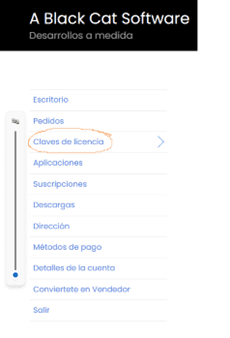 Automatically, the initial license key will be linked to your PC by encoding a unique identifier.
Keep the initial license key for any possible future changes to your PC so that you can update your license key accordingly.
What happens if my product was already activated and stops working?
In the error window, a message appears indicating what is happening. It could be due to one of three reasons:
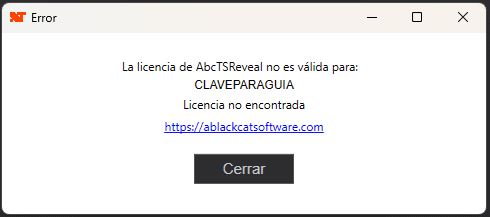
- You did not enter your key in the settings, please enter it.
- The message is License not found, meaning your machine ID or any other element that AbcSoftware's software uses to authenticate you has changed.
- Access your User Dashboard Log in to your account and navigate to the «License Keys» section in your personal area.
- Request a reset: Locate the license you wish to manage and click the button «Reset».
- Process confirmation: Wait a few seconds for the confirmation message to appear on the screen. This indicates that the server has successfully released the key.
- Reactivate your product: You can now launch the software on your new machine. The system will automatically recognize the license to bind it to your current hardware.
- Note: Please note that this process is instantaneous, but requires an active internet connection to sync the changes with our server.
- The message is License expired, meaning your subscription has expired and has not been renewed. Check your subscription and renew it if necessary to continue using your product.
Can I use ABC products on more than one PC?
Not for ABC's proprietary products. For security reasons, it is not possible to use an activation on more than one PC. To do so, you will need to purchase another license.
The linking to the PC is done through the MAC address. This address is set by the hardware device (WIFI, LAN), and it is necessary to keep the device to maintain the MAC address.
For third-party products sold in our online store, you should check directly with the seller to see if it is possible.
Can you help me with the NinjaTrader 8 platform?
Experience with NinjaTrader 8 is recommended, but we also offer dedicated training for those who want to learn (still in development—stay tuned for future updates and don't miss your spot in our training programs!).
Optimization and Backtesting: Although optimization and backtesting require advanced skills, NinjaTrader 8 provides the necessary tools. Below, you have a brief video introduction.
Using Templates: Below is a basic guide on how to use templates in NinjaTrader 8.
Need more help? Book a support session, and we will gladly assist you.
How do I activate my product in NinjaTrader 8? (ABC products purchased before March 2025)
Only for ABC products purchased before March 2025.
To activate any product in NinjaTrader 8, it is necessary to send the license code.
This code will be generated automatically when we use the product for the first time.
On the screen, an error message will appear—but don’t worry! That message contains the license code we need to activate your product.
The code is what appears above the orange line:
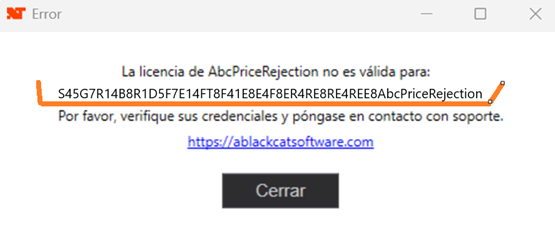
Copy the generated code and send it via email to contact@ablackcatsoftware.com with the subject "Activation", followed by the email you used to register as a customer on our website and the product purchased.
Example of subject:
«Activation yourname@mailhost.com AbcPriceRejection»